
Video analysis at scale is resource-intensive. Sports analytics companies process thousands of hours of footage. Security teams monitor multiple camera feeds. Content moderation systems analyze user-uploaded videos around the clock. Each of these use cases requires detecting and tracking objects across video frames - a task that was historically painful due to limited model capabilities and computational constraints.
The emergence of foundation models for video understanding has changed what’s possible. But running these models on large video archives still presents a practical challenge: how do you efficiently distribute processing across available GPU resources without spending more time on infrastructure plumbing than actual analysis?
SAM3 segmenting soccer players and ball. For demo purposes, sampled at 1 fps for faster inference.
SAM3: A foundation model for video segmentation #
SAM3 (Segment Anything 3) is Meta’s latest addition to the Segment Anything family. The big change from previous versions is text-based prompting - you can now describe what you want to segment using natural language like “soccer player” or “ball” instead of clicking on objects or drawing bounding boxes. The model then detects, segments, and tracks those objects across all video frames.
SAM3 was trained on a dataset containing over 4 million annotated concepts, enabling it to handle 270,000 unique concepts - roughly 50x more than existing benchmarks. Meta reports it doubles the accuracy of previous systems on both image and video segmentation tasks.
For this example, we’ll use SAM3 to process a soccer video dataset from Kaggle, detecting and tracking players and balls throughout each video.
The single-GPU bottleneck #
You could run SAM3 on a single node. Here’s what that looks like with SkyPilot (installation):
Launch it:
This works, but the dataset contains over 100 videos. Processing them sequentially on a single node would take a long time. If you have a deadline or need results quickly, you’ll want to parallelize across multiple nodes.
Even if you scale up within a single cluster, you may still be leaving GPU capacity idle on other clusters or clouds. Ideally, you’d use all available GPUs across your infrastructure - not just the ones on whichever cluster you happened to deploy to.
Distributed batch inference with SkyPilot pools #
SkyPilot’s Pools feature lets you create a fleet of GPU workers that share the same environment. You define the setup once, and SkyPilot keeps the workers warm and ready to process jobs as they come in.

The key benefits for video processing workloads:
- No cold starts: SAM3 model weights and the video dataset are downloaded once during pool creation, not repeated for each job
- Unified job queue: Submit any number of jobs - SkyPilot distributes them across available workers automatically
- Multi-cloud flexibility: Use GPUs from Kubernetes clusters, AWS, or other providers in the same pool
Setting up multi-cloud infrastructure #
Most organizations have GPU capacity scattered across different providers - a Kubernetes cluster on-prem, some reserved instances on AWS, maybe capacity from a neocloud provider. SkyPilot unifies access to all of these through a single interface.
First, check what infrastructure is available:
In my case, I have 2 Kubernetes clusters configured (k8s-cluster-one and k8s-cluster-two) as well as AWS. You could easily add GCP, Azure, or a neocloud like Lambda Labs, Nebuis or Coreweave.
Query GPU availability on each Kubernetes cluster:
We have 2 L40S GPUs on k8s-cluster-one, 3 on k8s-cluster-two, and AWS as a fallback. SkyPilot can use all of these together in a single pool.
Implementation #
Pool configuration
The pool YAML defines worker infrastructure and shared setup (view on GitHub):
Click to expand: pool.yaml
Job configuration
The job YAML defines the workload that runs on each worker (view on GitHub):
Click to expand: job.yaml
SkyPilot provides $SKYPILOT_JOB_RANK and $SKYPILOT_NUM_JOBS environment variables. Each job calculates which slice of videos it should process, ensuring work is evenly distributed without overlap.
Processing script
The Python script handles the actual segmentation (view on GitHub):
Click to expand: process_segmentation.py (key sections)
Running the pipeline #
Create the pool
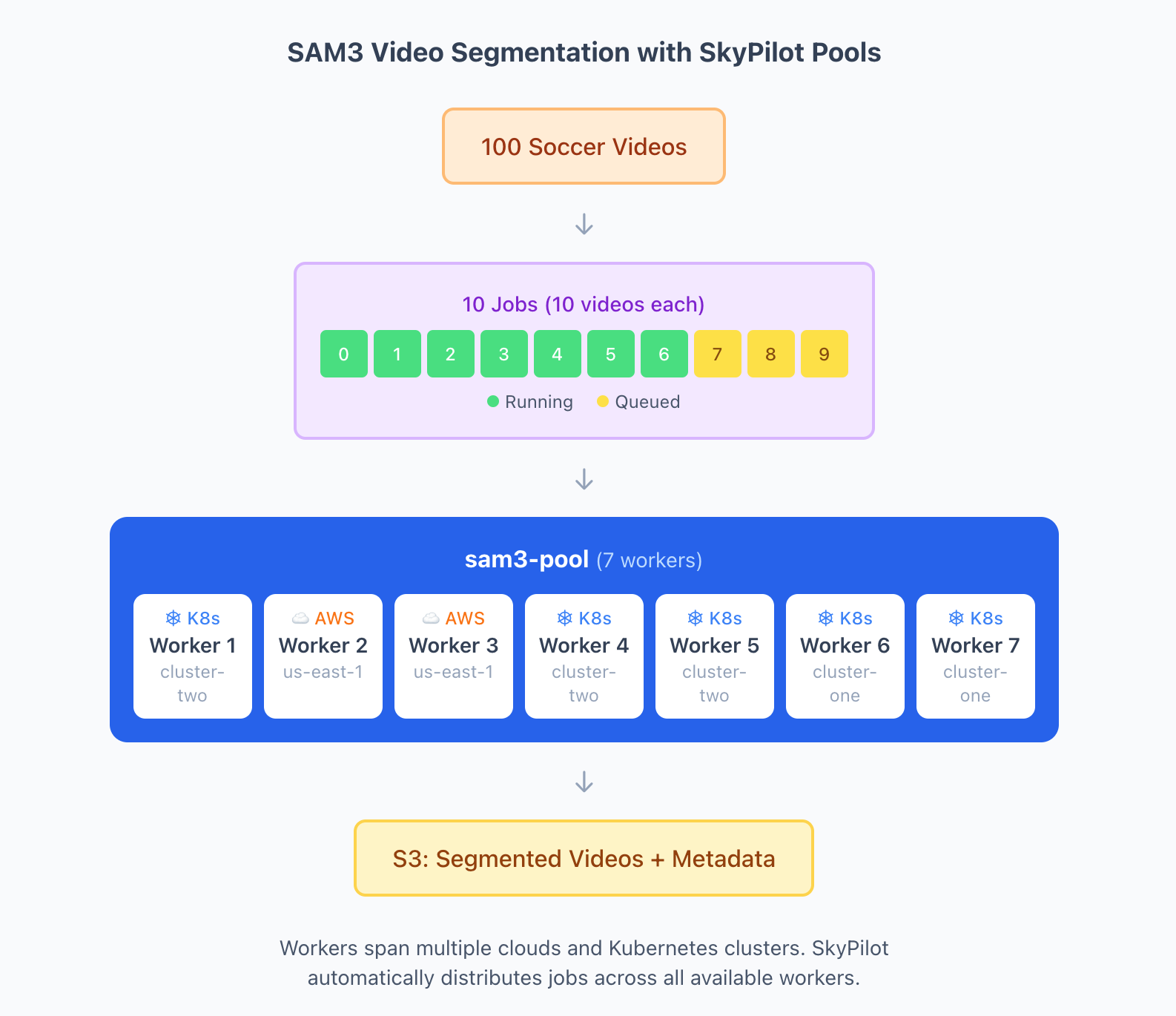
Spin up 7 workers across both Kubernetes clusters and AWS:
Check pool status
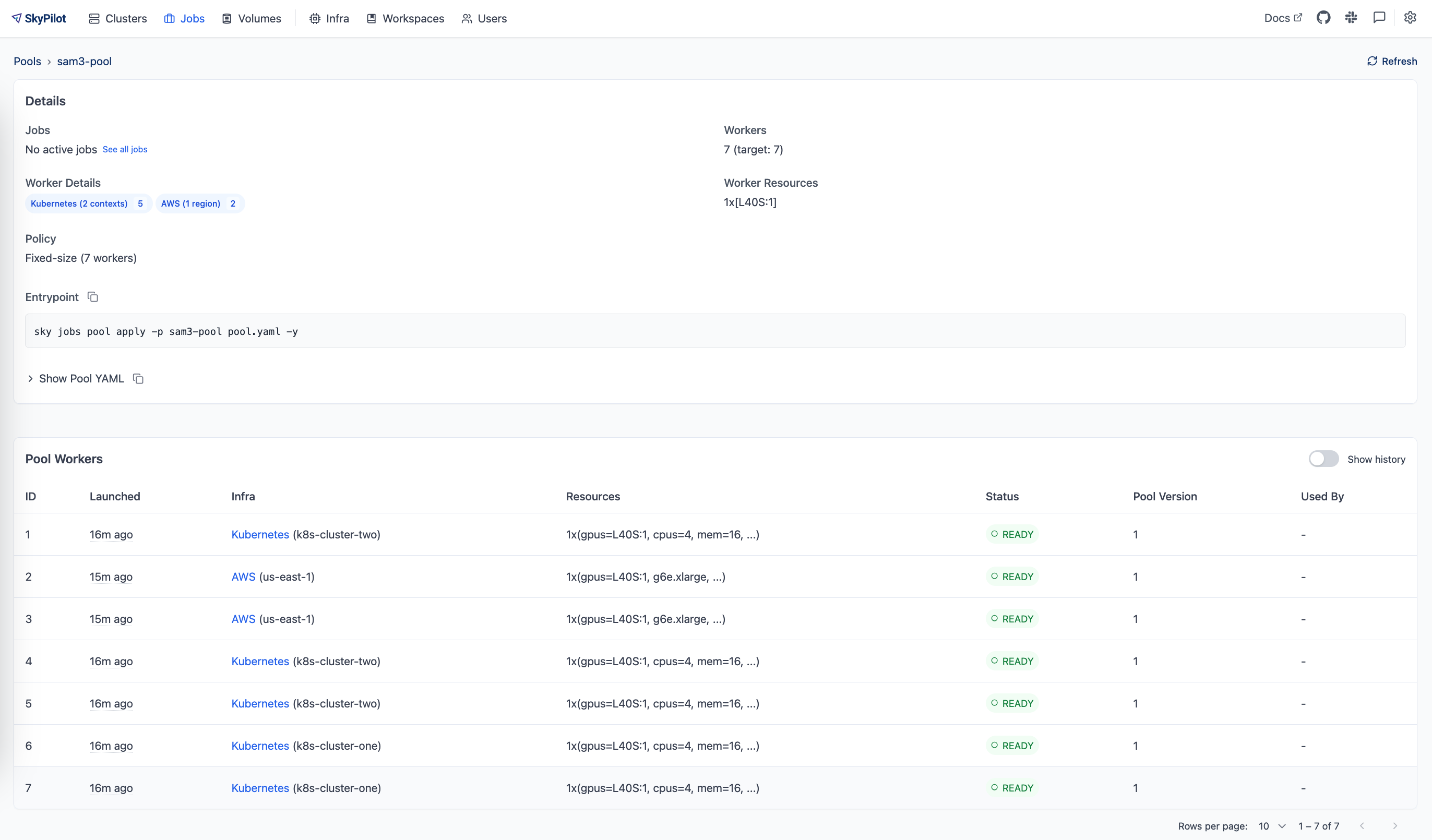
Once the pool is created, verify that workers are ready:
SkyPilot filled the pool using all 5 available L40S GPUs from both Kubernetes clusters, then provisioned 2 additional workers on AWS to reach the requested 7 workers.
Submit batch jobs
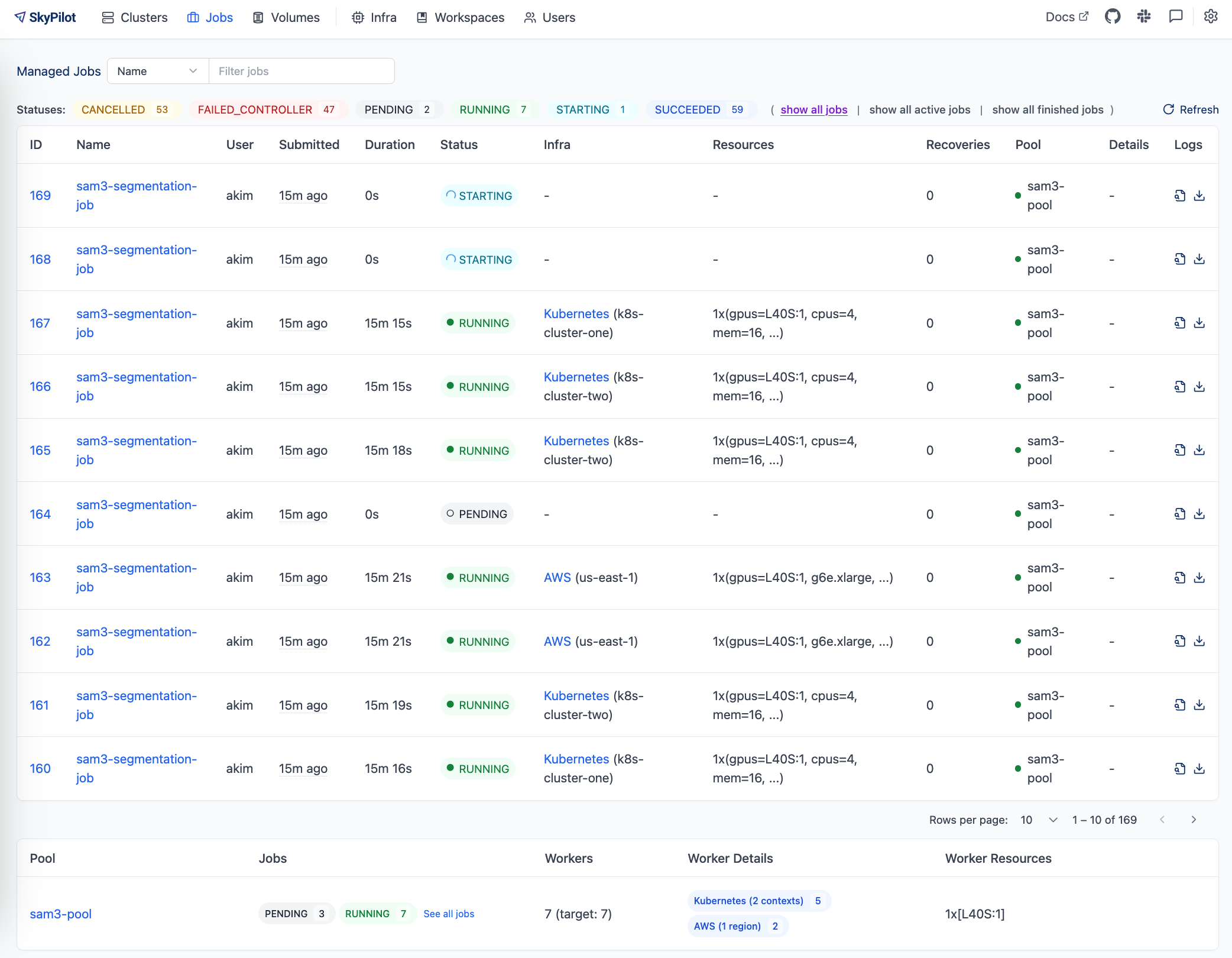
Submit 10 jobs to process the video dataset:
Seven jobs start immediately (one per worker), and the remaining 3 queue up.
View logs
Watch a specific job’s progress:
Scale up
If you need results faster, add more workers:
SkyPilot will provision additional workers from available infrastructure to meet the new count.
Cleanup
When finished, tear down the pool:
Results #
Processed videos and metadata are synced to S3:
Each video gets a segmented output with colored overlays (red for players, green for balls) and a metadata JSON with detection statistics.
How SkyPilot Pools unlocks capacity and boosts throughput #
The main benefit of SkyPilot Pools is unlocking GPU capacity that would otherwise sit unused across different clusters and clouds. Here’s how throughput scales with the infrastructure in this example:
Configuration | Available GPUs | Relative throughput |
Single GPU instance | 1 | 1x |
Single K8s cluster ( | 2 L40S | 2x |
Both K8s clusters | 5 L40S | 5x |
Multi-cloud pool (K8s + AWS) | 7 L40S | 7x |
Without SkyPilot, you’d be limited to whichever cluster has the most available GPUs - in this case, just 3 on k8s-cluster-two. With Pools, you aggregate capacity across both Kubernetes clusters and burst to AWS when needed, achieving near-linear scaling.
This pattern becomes more valuable as workloads grow. If you need to process 1000 videos instead of 100, you can scale the pool to 20+ workers across multiple regions and clouds - something that would require significant custom orchestration otherwise.
Adapting for other use cases #
The same pool-based pattern works for other video processing tasks:
Change text prompts: Edit PROMPTS in process_segmentation.py for different objects:
Adjust frame sampling: By default, the script samples 1 frame per second. For higher-fidelity tracking:
Use different GPUs: Update the pool and job YAML files:
Non-video workloads: SkyPilot Pools work for any batch processing task, not just video. See the documentation for examples like batch text classification with vLLM and document OCR with DeepSeek OCR.
Resources #
- SkyPilot Pools Documentation
- SAM3 on Hugging Face
- Complete example code - includes
pool.yaml,job.yaml,process_segmentation.py - Soccer Videos Dataset