
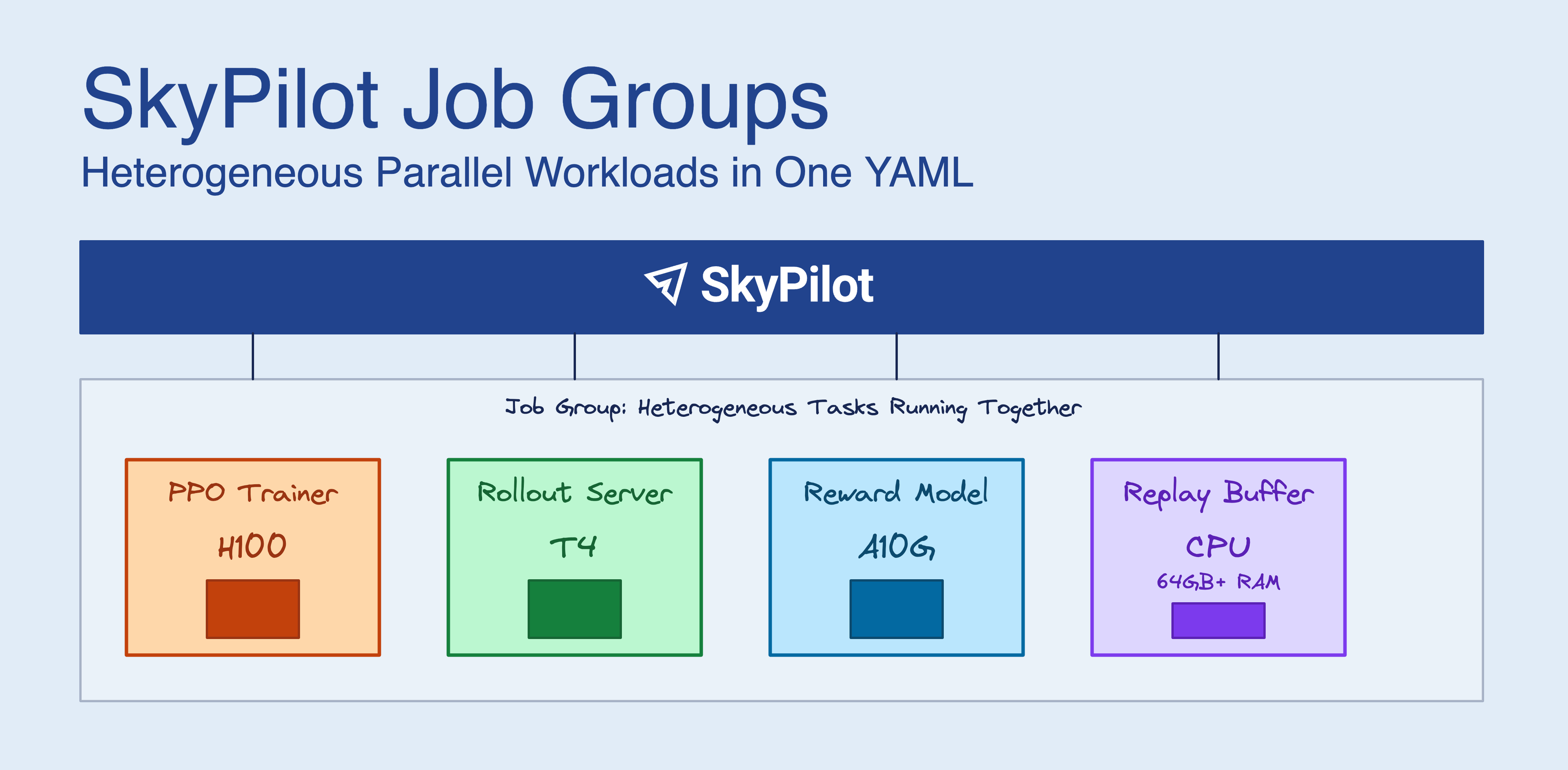
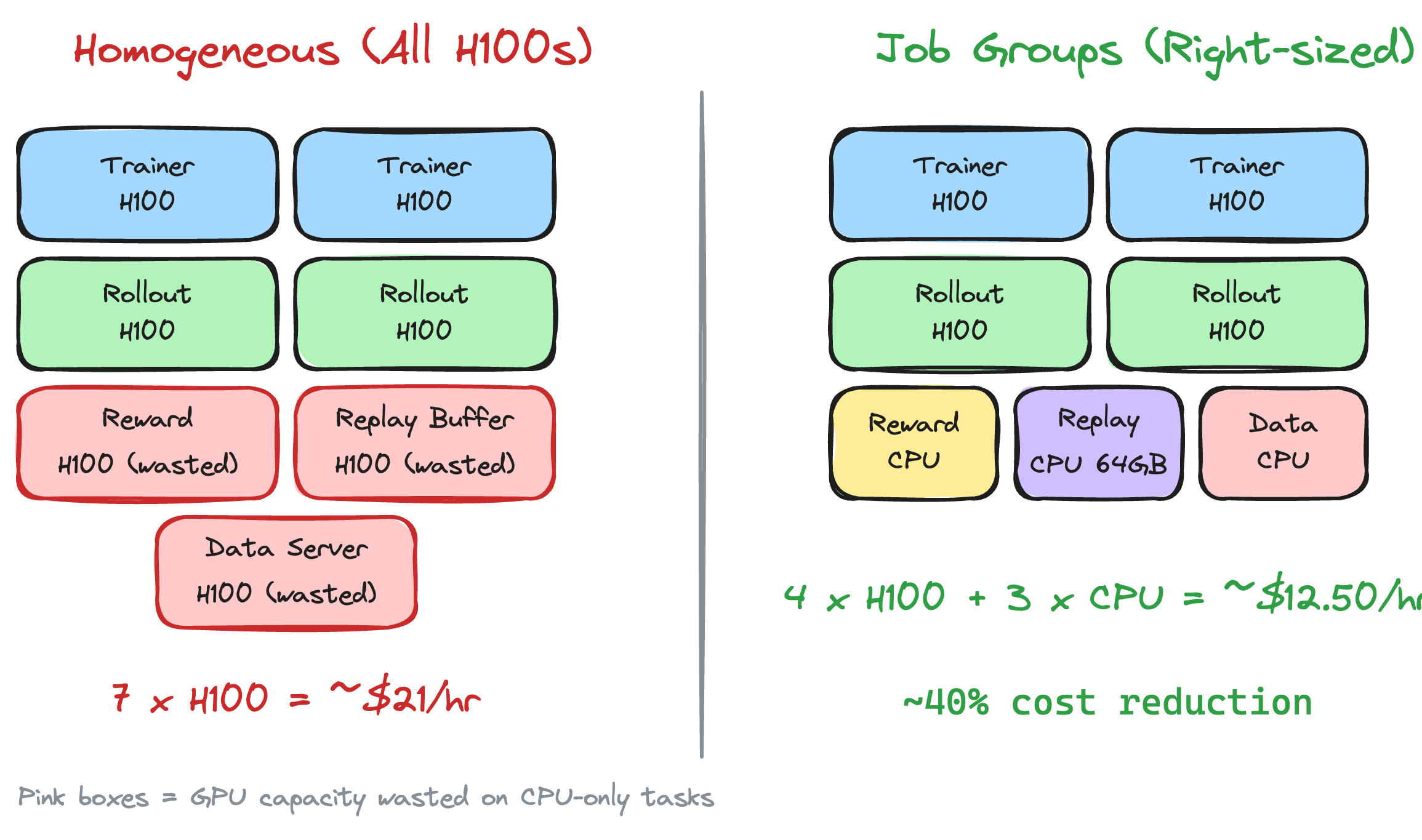
RL post-training for LLMs (GRPO, PPO, RLHF) doesn’t fit the traditional “N identical GPUs” model. You need beefy GPUs for the trainer, cheaper GPUs for inference rollouts, and high-memory CPU instances for replay buffers. Running everything on H100s works but wastes money. Splitting across separate jobs means writing your own coordination logic.
SkyPilot Job Groups let you define all these components in one YAML file. SkyPilot provisions them together, sets up networking between them, and tears everything down when training finishes.
What you get #
- Heterogeneous hardware: Right-size each component — H100s for the trainer, A10Gs for inference, high-memory CPUs for replay buffers — instead of paying for H100s across the board
- One YAML for everything: Define all components and their resources in a single file
- Service discovery: Tasks find each other via hostnames like
trainer-0.my-job-group:8000 - Coordinated shutdown: When the trainer exits, SkyPilot terminates the auxiliary services
- Automatic recovery: If a task gets preempted, it restarts without killing the others
While we’ll walk through RL post-training as the main example, Job Groups work for any heterogeneous parallel workload: distillation pipelines (teacher on H100s, student on A10Gs), RAG systems (embeddings on T4s, retrieval on high-memory CPU, LLM on H100s), simulation + learning (CPU-heavy simulators with GPU-based training), or synthetic data generation alongside fine-tuning.
The problem #
RL post-training with GRPO or PPO runs multiple services at once:
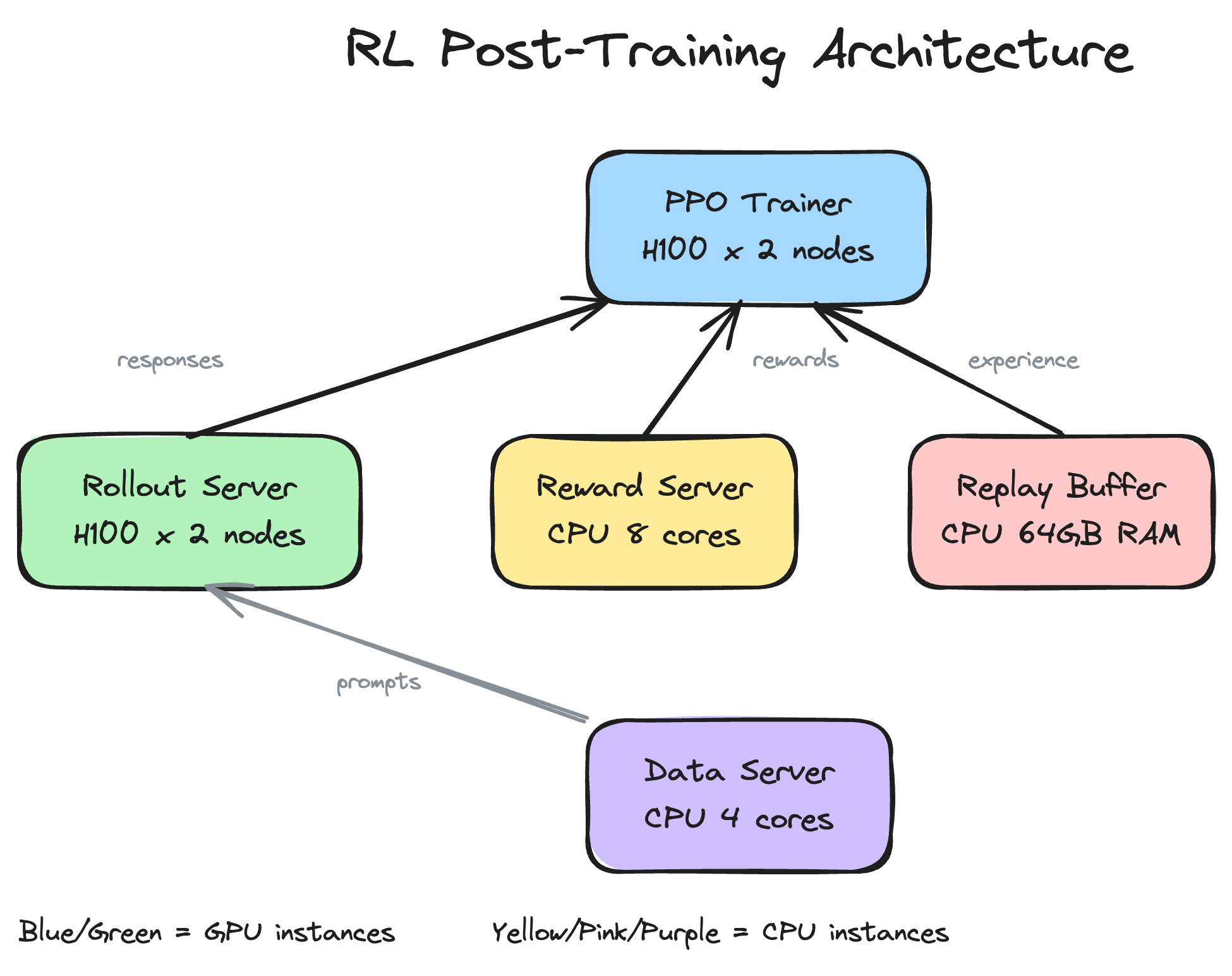
Component | What it needs | What it does |
Policy Trainer | H200 or H100 or A100 | Gradient updates |
Rollout/Inference | A10G, L4, or T4 | Generate responses for the policy |
Reward Model | GPU or CPU | Score the generated responses |
Replay Buffer | 64GB+ RAM, no GPU | Store experience tuples |
Data Server | CPU | Serve training prompts |
Your replay buffer doesn’t need an H100. Your data server doesn’t need a GPU at all. But getting different instance types to launch together, find each other on the network, and shut down cleanly is annoying:
- You have to launch them atomically (all succeed or all fail)
- You need service discovery so they can talk to each other
- You need the auxiliary services to stop when training stops
- You need failures in one component to not cascade to others
Most orchestrators either force homogeneous nodes or make you handle this yourself.
How it works #
A Job Group is multiple tasks that run in parallel as one unit. Each task can request different resources. SkyPilot provisions them together, wires up the networking, and manages their lifecycle.
YAML structure
You write a multi-document YAML with a header and then one section per task:
Launch it:
SkyPilot provisions everything at once, configures the network, and starts all tasks.
Service discovery
Tasks talk to each other via DNS hostnames:
For a job group named rl-training with a 2-node trainer:
ppo-trainer-0.rl-training(head node)ppo-trainer-1.rl-training(worker node)data-server-0.rl-trainingreplay-buffer-0.rl-training
SkyPilot sets SKYPILOT_JOBGROUP_NAME in each task’s environment, so you can build hostnames in your code:
Primary vs. auxiliary tasks
The primary_tasks field says which tasks determine when the job is done:
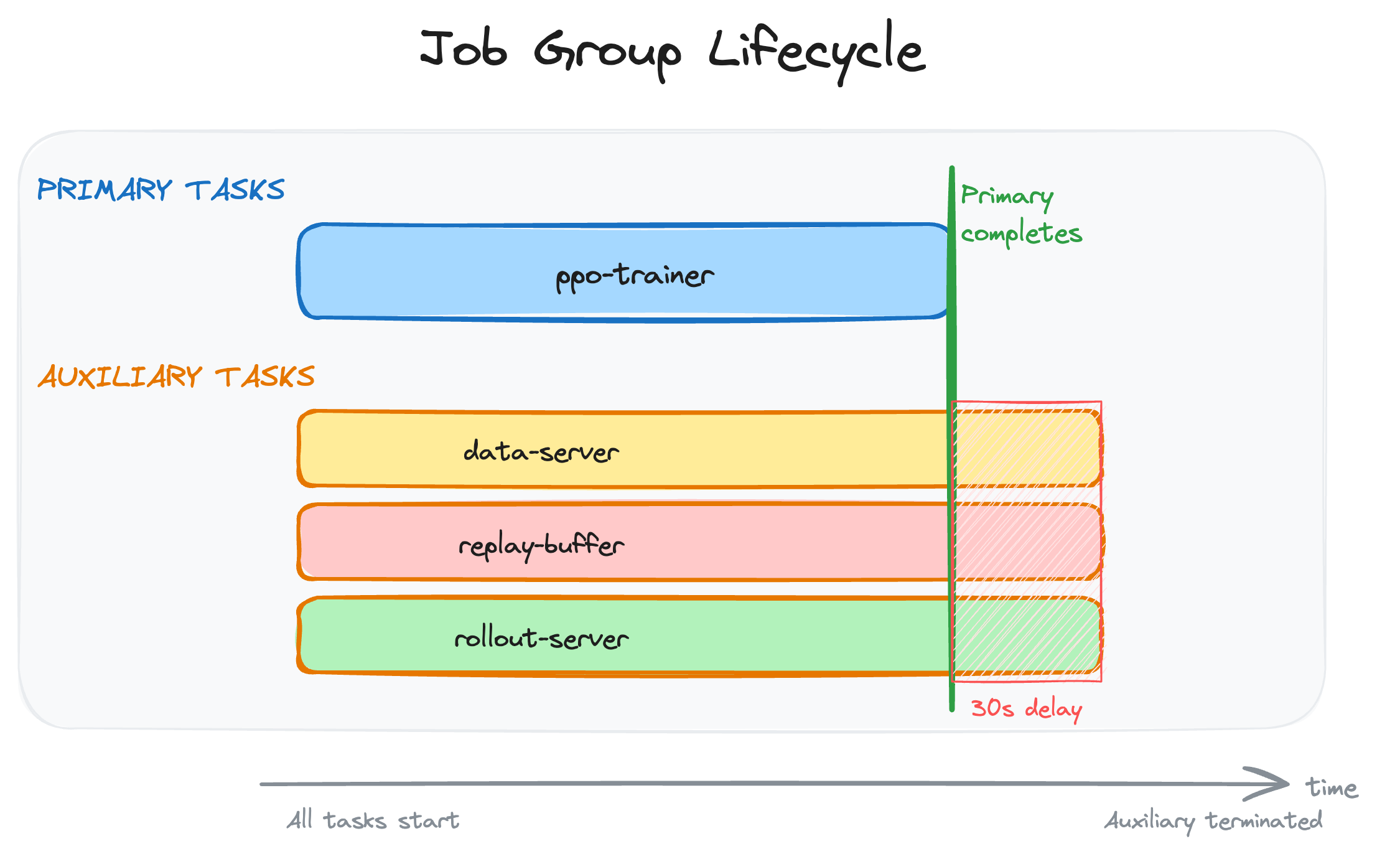
- Primary tasks: When these finish, the job is complete
- Auxiliary tasks: Services that run until the primary tasks exit (data servers, replay buffers, etc.)
When the trainer exits:
- SkyPilot waits
termination_delay(30 seconds) for graceful shutdown - Auxiliary tasks get SIGTERM
- Resources get released
If a primary task fails, auxiliary tasks terminate immediately.
Full example: 5-component RLHF #
Here’s a complete setup with all five components:
Click to expand the full YAML
This launches:
- 1 CPU instance for data serving
- 2 H100 nodes for inference (with load-balanced routing)
- 1 CPU instance for reward computation
- 1 high-memory CPU instance for replay buffer
- 2 H100 nodes for PPO training
Total: 4 H100 GPUs + 3 CPU instances.
Comparison to alternatives #
Most orchestrators don’t handle heterogeneous parallel workloads well:
Solution | Heterogeneous? | Service Discovery | Multi-Cloud | Limitation |
Yes, in YAML | Automatic DNS | 20+ clouds, K8s, Slurm | No cross-cloud yet | |
Actor-level | Ray object refs | Multi-cloud | Must use Ray APIs | |
Explicit components | Env vars | On-prem only | No cloud | |
ReplicatedJobs | K8s DNS | Any K8s | Alpha API, no dynamic scaling | |
Task-level | Gang scheduling | Any K8s | Task deps conflict with gang | |
2 instance groups | Manual | AWS only | Same container, manual setup |
Why Job Groups
Less YAML: A 5-component RL setup fits in one SkyPilot file. The equivalent Kubernetes JobSet needs 3-4x more YAML plus separate Service definitions.
Lifecycle is declarative: primary_tasks + termination_delay handles shutdown. With other tools you write application-level coordination (Ray), add sidecar containers (Kubernetes), or script it yourself (Slurm).
Portable: The same file runs on AWS, GCP, Azure, Lambda, Nebius, or Kubernetes. No per-cloud config.
Getting started #
Install SkyPilot and verify your setup:
SkyPilot will detect your Kubernetes cluster from ~/.kube/config. For cloud VMs, install with skypilot[aws], skypilot[gcp], etc. See the installation docs for details.
Your first Job Group
This example runs a trainer and evaluator in parallel, sharing checkpoints via a Kubernetes volume.
1. Create the shared volume:
2. Create train-eval.yaml:
3. Launch:
4. Check logs:
Examples
Working examples in the SkyPilot repo:
Sharing data between tasks
Tasks often need to share checkpoints, datasets, or intermediate results. Three options:
SkyPilot Volumes (Kubernetes): SkyPilot Volumes provide persistent storage across tasks. Create a volume once with sky volume create <name> --size <GB>, then mount it in each task using the volumes field.
Cloud buckets: For large datasets or cross-region access, SkyPilot Storage mounts S3, GCS, or other cloud buckets.
Local file mounts: Use file_mounts to sync code and config files to all tasks.
Limitations #
- Single region: All tasks run on the same cloud/region or Kubernetes cluster. Cross-cloud Job Groups aren’t supported yet.
- Kubernetes for DNS: Hostname-based discovery needs Kubernetes. On SSH-based clouds, SkyPilot uses static IP mapping.
- Fixed replicas: You set replica counts at submission time. No dynamic scaling during execution.
To receive latest updates, please star and watch the project’s GitHub repo, follow @skypilot_org, or join the SkyPilot community Slack.