
AWS Batch works well for traditional enterprise batch processing (see their case studies 1 and 2). But AI workloads have different requirements - they’re more interactive, need flexible GPU access, and benefit from simpler iteration cycles.
In this post, we explore how you would use AWS Batch to run AI batch inference at scale, and explain why it does not fit well with modern AI workloads. We’ll also show an alternative approach using SkyPilot.
Why AWS Batch struggles with AI workloads #
AWS Batch launched in 2016 for traditional enterprise batch processing - ETL jobs, financial risk calculations, and genomics pipelines. It handles these workloads well.
But AI workloads have fundamentally different characteristics that AWS Batch struggles to address:
- Long end-to-end setup time: Complex setup and infrastructure configuration delays getting started
- GPU scarcity: Limited to a single region with limited high-end GPU capacity
- Long job completion time: Limited parallelism due to insufficient GPU availability, leads to long job completion time
- Developer experience: ML engineers need interactive tools (SSH, Jupyter, debuggers), rapid iteration without infrastructure overhead, and the ability to focus on models rather than operations
We will take a look at an example of how AWS Batch handles an AI batch inference as an infrastructure configuration problem:
- Configure compute environments with complex JSON
- Set up job definitions with container requirements
- Manage job queues with priority ordering
- Hope p3.8xlarge instances are available in us-east-1
- Manually reconfigure for us-west-2 when they’re not
Example: Using AWS Batch for AI embedding generation #
Let’s walk through a concrete example: large-scale embedding generation using the aws_batch_demo_embeddings project. This will show how AWS Batch’s infrastructure-first design creates friction for ML workloads.
The AWS Batch approach: Six required components
Before running a single job, AWS Batch requires configuring six interconnected components:
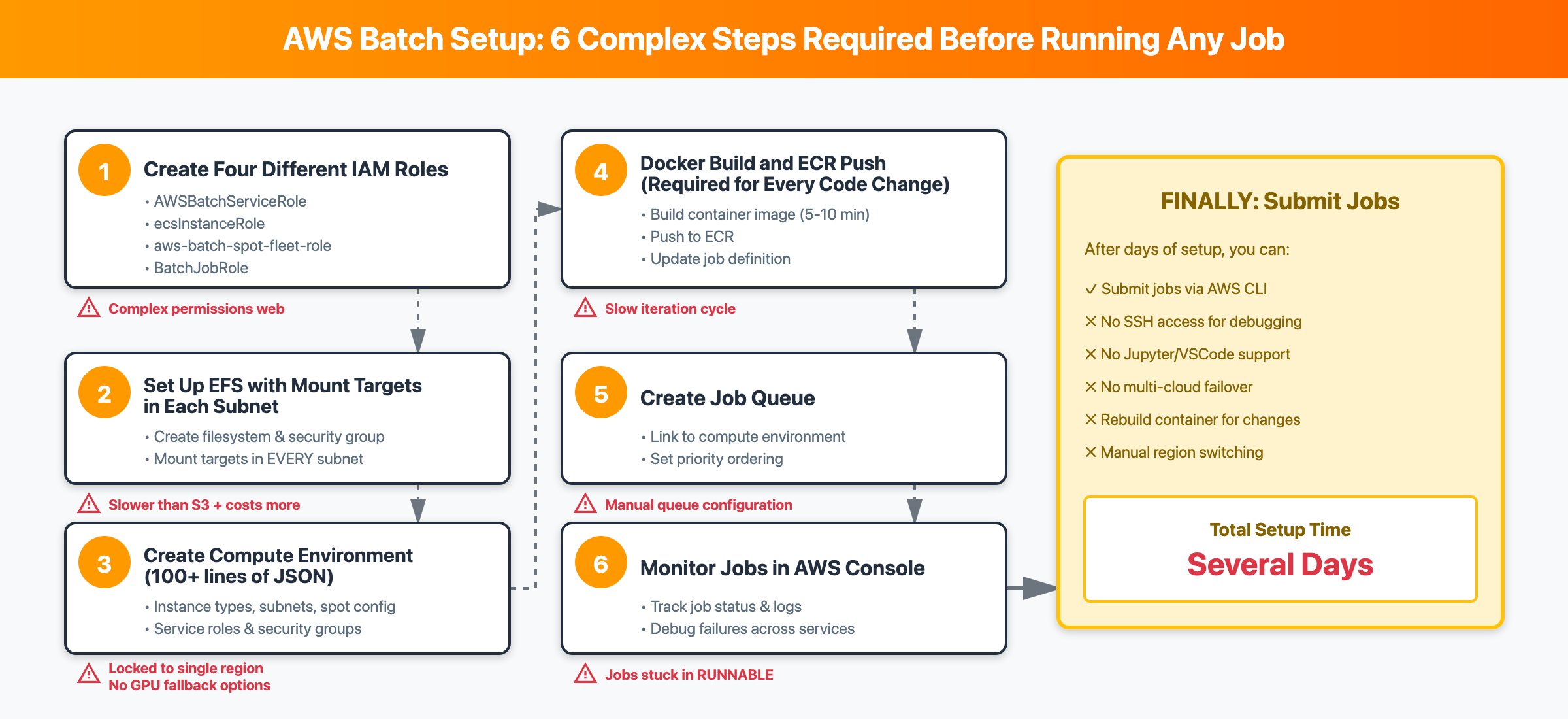
The official “getting started” flow requires 6 steps. (The comprehensive commands can be found here)
- Create IAM roles (4 different roles: service role, instance role, spot fleet role, job execution role) For example, creating the Batch service role
Click to view commands for remaining 3 IAM roles (~15 lines)
- Set up storage for the job output (filesystem + security groups + mount targets in every subnet) Creating EFS requires 4 steps with more than 20 lines of commands
Click to view remaining EFS setup commands (~20 lines)
- Configure the compute environment (instance types, scaling limits, spot configuration)
Click to view compute environment configuration
- Create a job queue (priority, compute environment ordering)
- Create job definition with all infrastructure specific configs (container config, resource requirements, volume mounts)
Click to view job definition configuration
- Create job container image and submit jobs (Docker build + push for every code change, then submit via CLI) Every code change could involve 5-15 minutes, which leads to slow iteration.
Click to view complete job submission loop script
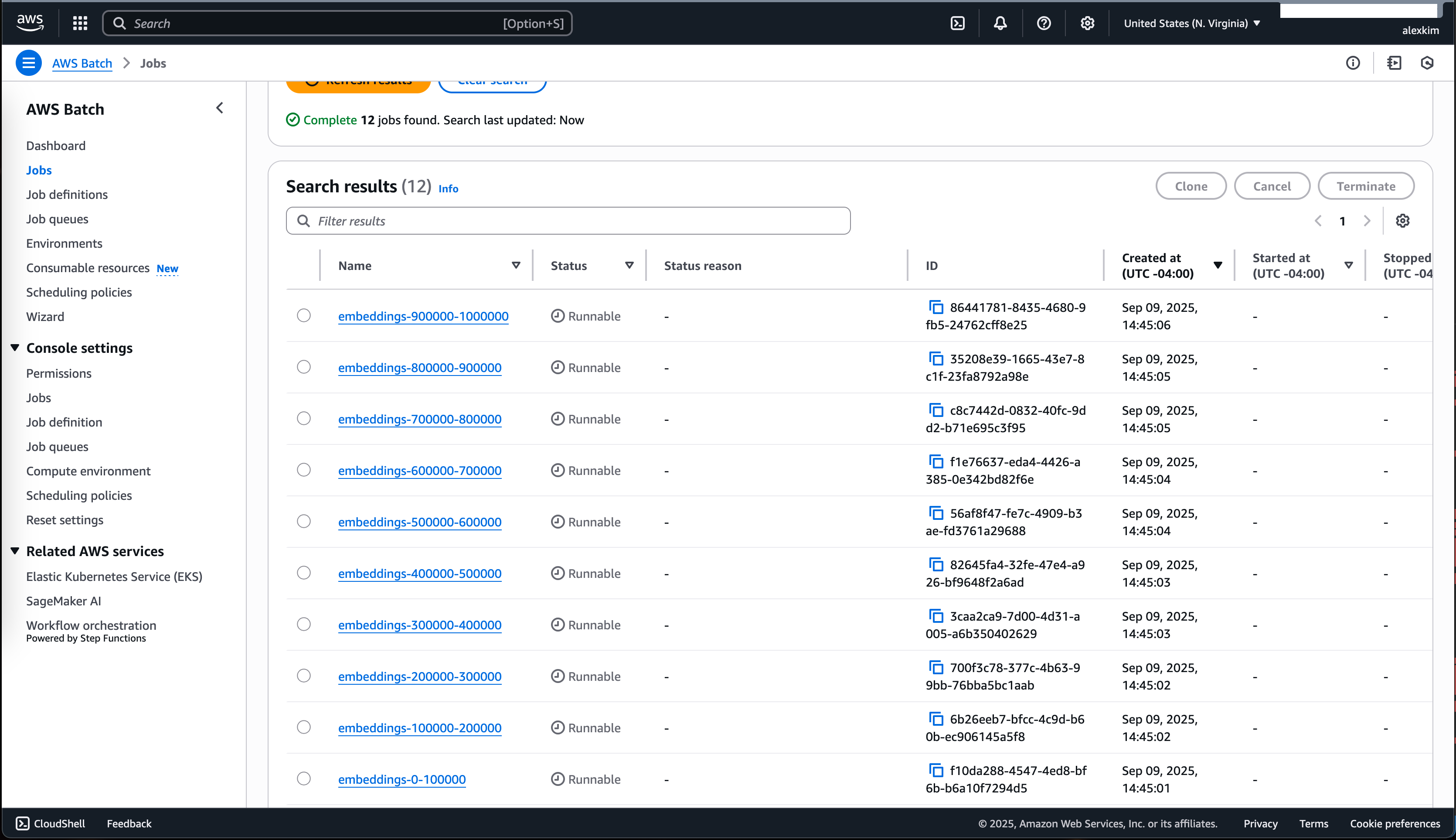
Monitor the jobs
After submission, you monitor job progress in the AWS Console:
Key challenges with AWS Batch for ML workloads
After going through this setup, several fundamental issues become clear:
- Regional limitation: AWS Batch is fundamentally a regional scheduler. When
us-east-1runs out of GPUs, you must manually reconfigure forus-west-2. No multi-region or multi-cloud capability. - No GPU support on Fargate: GPU resources aren’t supported on Fargate jobs, forcing you to manage EC2 instances
- No interactive debugging: ECS Exec isn’t supported by AWS Batch, removing SSH access for ML debugging
- Jobs stuck in RUNNABLE: Batch jobs frequently get stuck due to capacity or configuration issues - serious enough that AWS maintains a dedicated troubleshooting guide
- Limited observability: AWS provides a reference solution requiring CloudFormation/Lambda/CloudWatch just to monitor job delays
- EFS complexity: Shared data mounts require Amazon EFS, which must be pre-mounted on the AMI with mount targets in every subnet
SkyPilot: an alternative job-centric way - focus on AI workloads, instead of infra #
Now let’s see how SkyPilot handles the same embedding generation workload. Instead of configuring infrastructure components, you define the task itself:
The single SkyPilot step without all the infra configurations:
What SkyPilot gets rid of for AI engineers compared to AWS Batch?
- No ECR image management
- No compute environment configuration
- No job queues
- No IAM role creation
- No VPC/subnet configuration
- No EFS mount targets
Launching jobs is equally simple with SkyPilot:
CLI
Python SDK
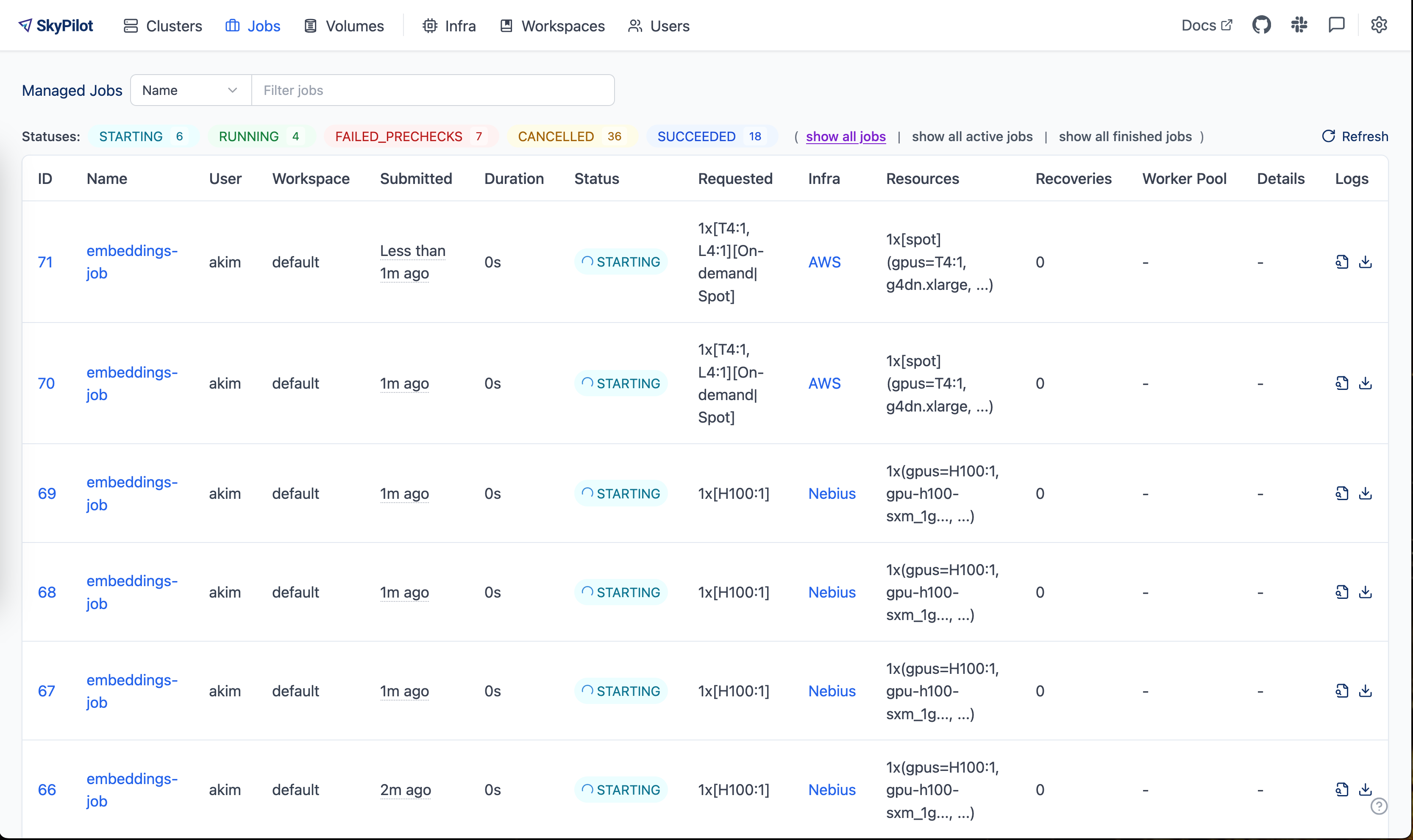
The SkyPilot dashboard shows the submitted jobs running across multiple clouds, automatically finding available GPUs wherever they exist:
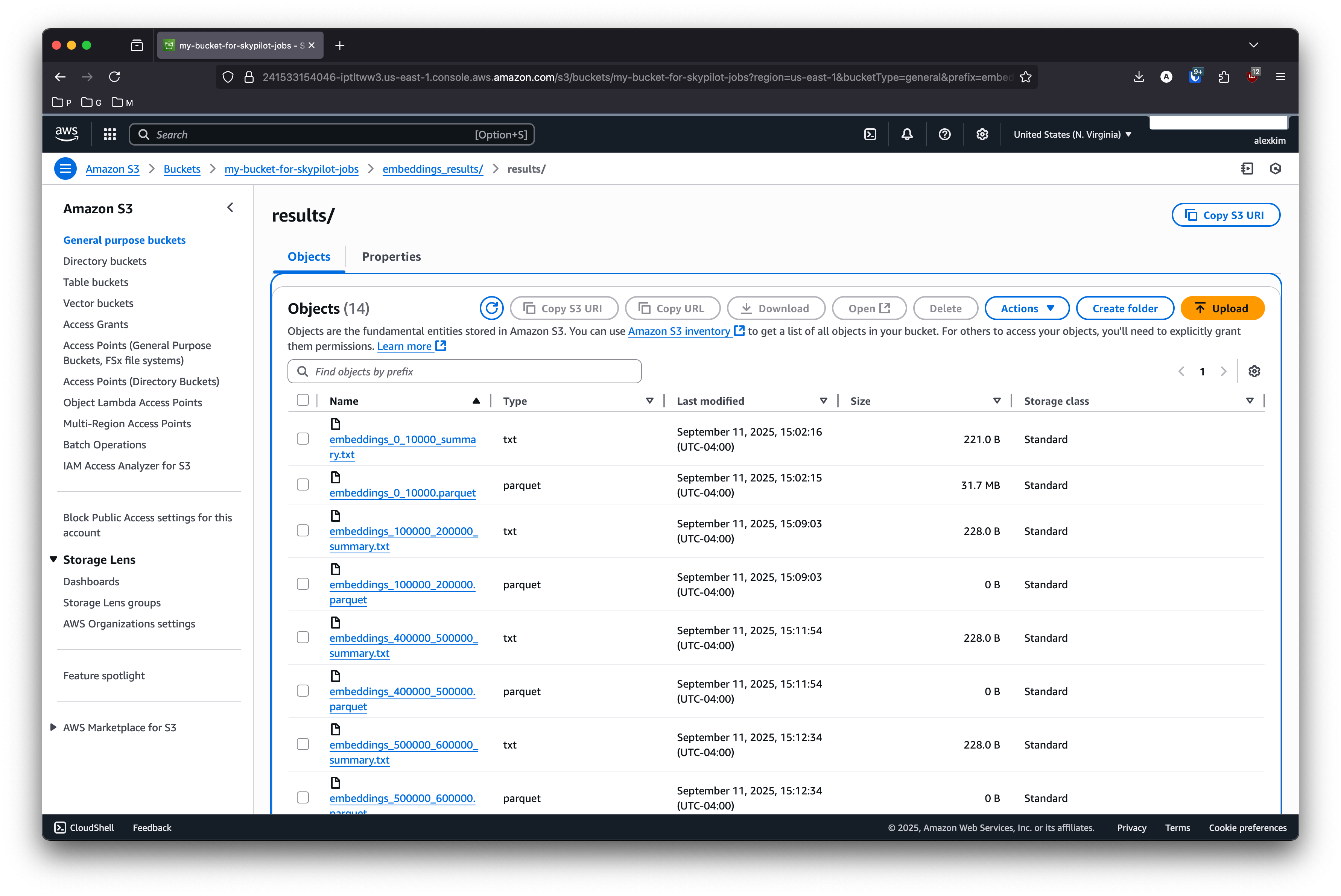
After the jobs complete, the resulting parquet files are written directly to S3:
AWS Batch vs SkyPilot: Comparison #
Now that we’ve seen both approaches for the same embedding generation task, let’s compare them across three key dimensions: GPU access, performance & cost, and operational overhead.
1. Multi-cloud GPU access: single region vs global scale
Capability | AWS Batch | SkyPilot |
Region scope | Single region only | Multi-region, multi-cloud automatic |
GPU unavailable? | Manually reconfigure for new region, no cross-region job view, manual load balancing across regions | Automatically finds GPUs elsewhere and load balances |
Cloud support | AWS only | 17+ clouds (Hyperscalers and Neoclouds) |
Real-world impact:
SkyPilot’s multi-region approach unlocks a key insight: popular regions like us-east-1 have limited capacity, but “forgotten regions” across the globe have tons of available capacity. By spreading workloads across these regions, you access significantly more compute.
In this case study, SkyPilot achieved 9x speedup (20 hours -> 2.3 hours) and 61% cost reduction by automatically distributing 406 jobs across 12 AWS regions globally when a single region could only provide 47 GPUs:
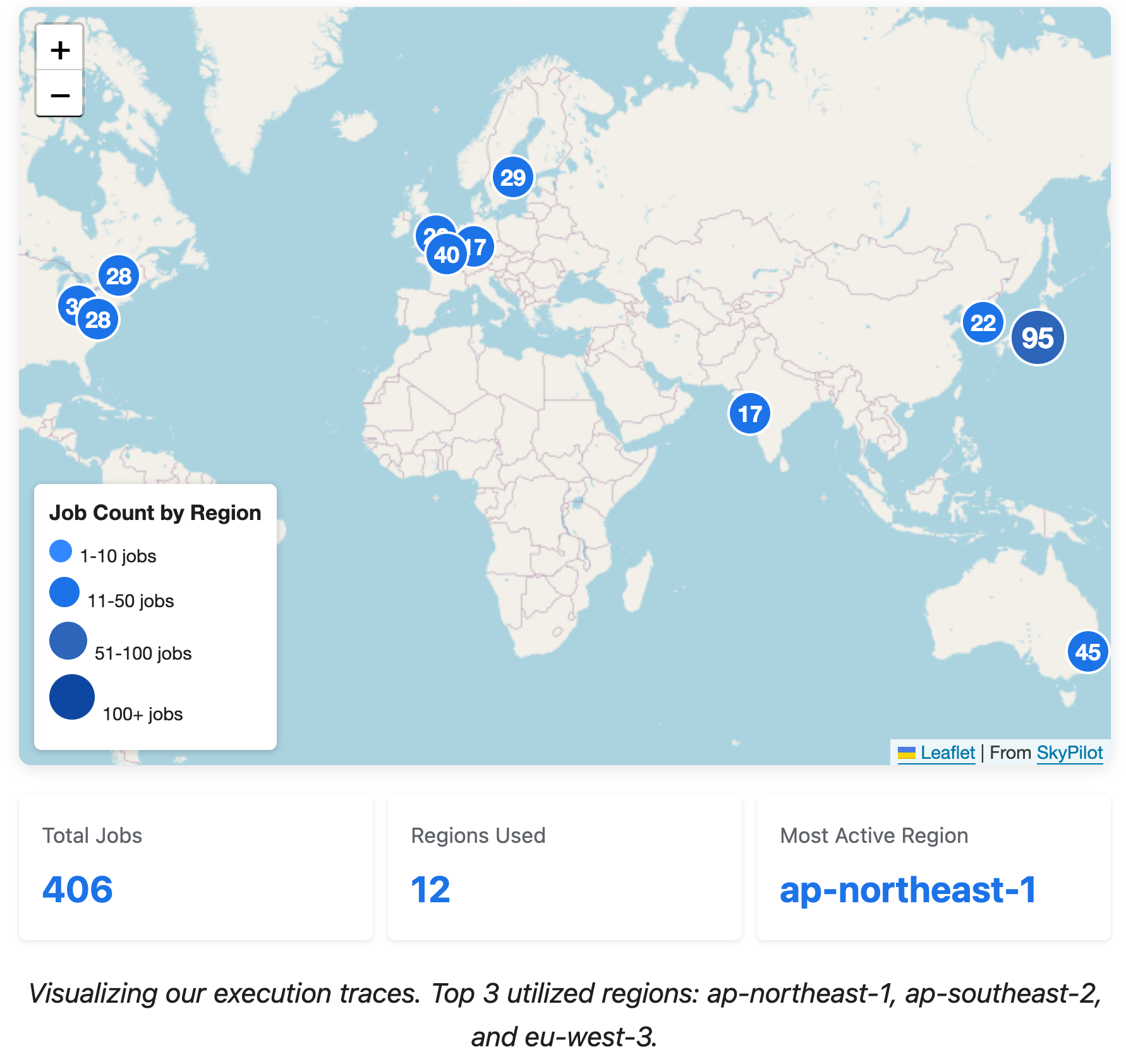
Click to explore the interactive map.
The environment variables for distributed jobs (master address, node rank, world size) are automatically configured.
2. Developer productivity: Fast iteration and interactive debugging
ML engineers need to iterate quickly on code and debug interactively. AWS Batch’s Docker-centric workflow and lack of SSH access create significant friction.
Challenge | AWS Batch | SkyPilot |
Code iteration | 5-15 min (Docker rebuild + ECR push + update) | Seconds (direct code sync) |
Impact of 10 changes/day | Hours of waiting | Minutes total |
Interactive debugging | No SSH access (ECS Exec unsupported) | Full SSH, Jupyter, VSCode support |
Code iteration cycle comparison:
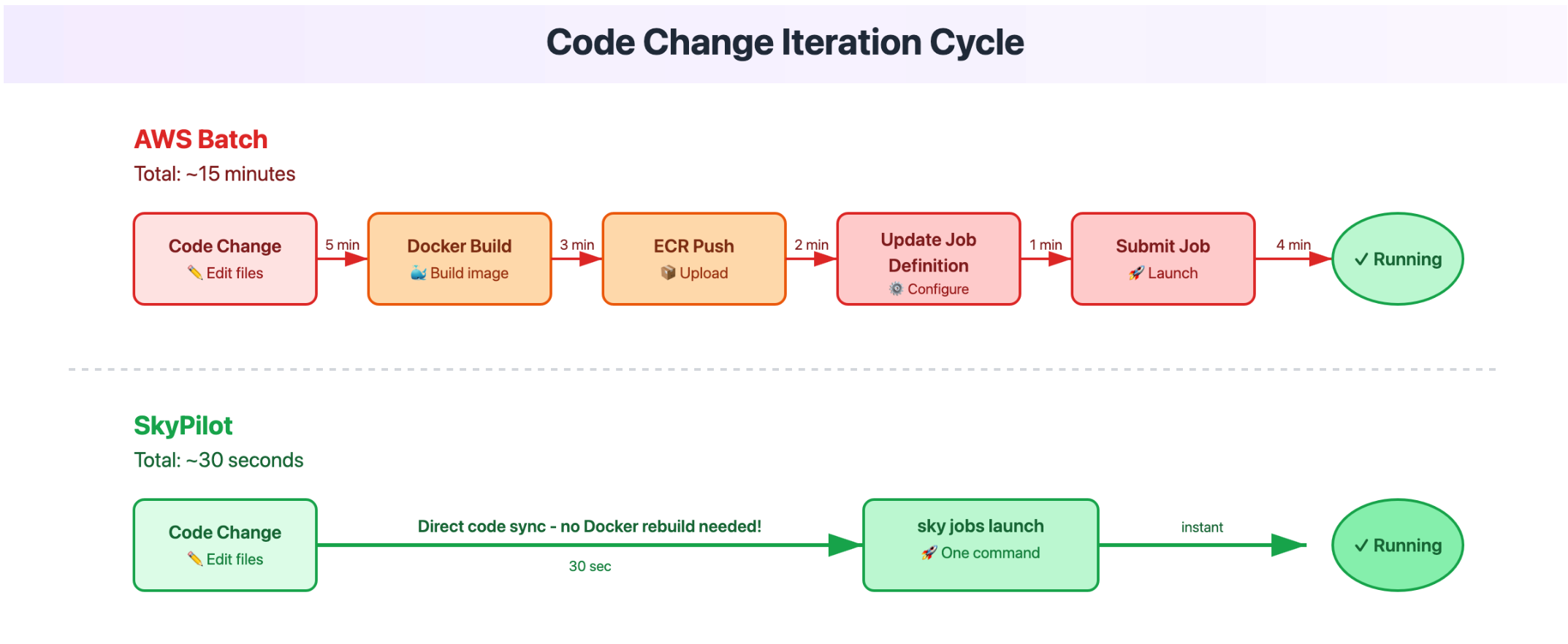
The difference between several minutes and a few seconds compounds quickly: 10 code changes in a day = hours of waiting with AWS Batch vs minutes with SkyPilot.
3. End-to-end time and cost savings
Setup time and operational overhead:
Metric | AWS Batch | SkyPilot |
Steps to run a job | 6 steps (IAM, EFS, compute env, job queue, job def, ECR) | 1 step (YAML file) |
Initial setup time | 2-5 days | 1-3 hours |
Debugging | 20-40 minutes (logs across multiple services) | 2-5 minutes ( |
Cost optimization opportunities:
Cost Factor | AWS Batch | SkyPilot | Savings |
Cloud selection | AWS only, single region | Multi-cloud arbitrage. Neoclouds offer much more attractive GPU pricing. | Find cheapest GPUs globally |
GPU allocation | Fixed instance sizes (e.g., 8 GPUs minimum) | Request exactly what you need (e.g., 2 GPUs if cloud supports it) | Eliminate over-provisioning |
Storage options | Amazon EFS required for shared storage | Flexible: S3, GCS, EFS, third-party (e.g., Cloudflare R2) | Use cheapest/best storage option |
Real-world example: 11x cost reduction and improved productivity
Avataar, an AI company that creates product videos from 2D images, achieved dramatic improvements with SkyPilot:
- 11x cost reduction in infrastructure expenses
- Hourly GPU costs dropped from $6.88 (AWS) to $2.39 (RunPod) through multi-cloud arbitrage
- Saved tens of hours per week on infrastructure management, boosting team productivity
- Enabled seamless multi-cloud deployment across AWS, Azure, GCP, Nebius, etc
- Scaled from 1 to 1000+ GPUs as needed without infrastructure reconfiguration
When to use which system #
We’ve seen how AWS Batch requires extensive infrastructure configuration while SkyPilot focuses on the task itself. We’ve compared their capabilities across GPU access, cost & performance, and operational overhead. Now, when should you use each?
Use AWS Batch if:
- Running traditional batch processing (nightly reports, ETL, financial calculations)
- You have dedicated infrastructure teams managing Terraform/CloudFormation
Use SkyPilot if:
- You’re doing ML/AI work that needs GPUs
- You want interactive development (SSH into jobs, Jupyter/VSCode support)
- You use experiment tracking tools (MLflow, W&B)
- You want faster iteration cycles without Docker rebuild overhead
- You are looking for increasing the productivity of your data scientists/AI engineers on clouds
- You need automatic cost optimization and multi-cloud GPU access
- You want access to new clouds & Neoclouds (RunPod, Nebius, Lambda Labs, etc.) for future-proofing
Many organizations use both: AWS Batch for production ETL pipelines with deep AWS integration, SkyPilot for ML training and inference that needs GPU flexibility and multi-cloud access.
Even if you’re deep in the AWS ecosystem, it’s worth trying SkyPilot for AI workloads to gain the benefits of faster iteration, automatic multi-region GPU access, and significant cost savings - while still running on AWS infrastructure when desired.
Conclusion #
We started by exploring why AWS Batch, designed for traditional enterprise batch processing, struggles with AI workloads. Through a concrete embedding generation example, we saw how AWS Batch requires configuring six interconnected components before running a single job.
In contrast, SkyPilot’s job-centric approach lets you define the task itself - no infrastructure configuration needed. Our comparison across three dimensions showed clear advantages:
- Multi-cloud GPU access: Automatic distribution across 17+ clouds and all regions vs single-region limitation
- Time and cost: 11x cost reduction, seconds for code changes vs minutes, 1-3 hour setup vs 2-5 days
- Operational overhead: Simple task definition vs complex state management and permissions
For ML teams fighting GPU availability and infrastructure complexity, SkyPilot provides significant cost reduction, automatic multi-cloud GPU access, and faster iteration cycles - while AWS Batch remains better suited for traditional enterprise batch processing with deep AWS integration requirements.
- Based on experience of an AI engineer with cloud experience but no prior hands-on experience with either AWS Batch or SkyPilot. ↩︎