

Serving GenAI models has two big problems: GPU scarcity and high costs.
- GPU shortage: AI deployments often run out of capacity in a single region (or a data center). However, existing serving solutions (e.g., Kubernetes) focus on a single region or even a single zone, which means GenAI workloads often fail to autoscale due to capacity shortage.
- High costs: GPU instances are usually significantly more expensive than CPU instances, especially when you are tied to a single cloud provider. For an A100-80GB instance, the cost difference can be up to 30% across the big three clouds.
To mitigate these problems, we introduce SkyServe, a simple, cost-efficient, multi-region, multi-cloud library for serving GenAI models, which brings ~50% cost savings and offers the best GPU availability.
SkyServe: A multi-region, multi-cloud serving library #
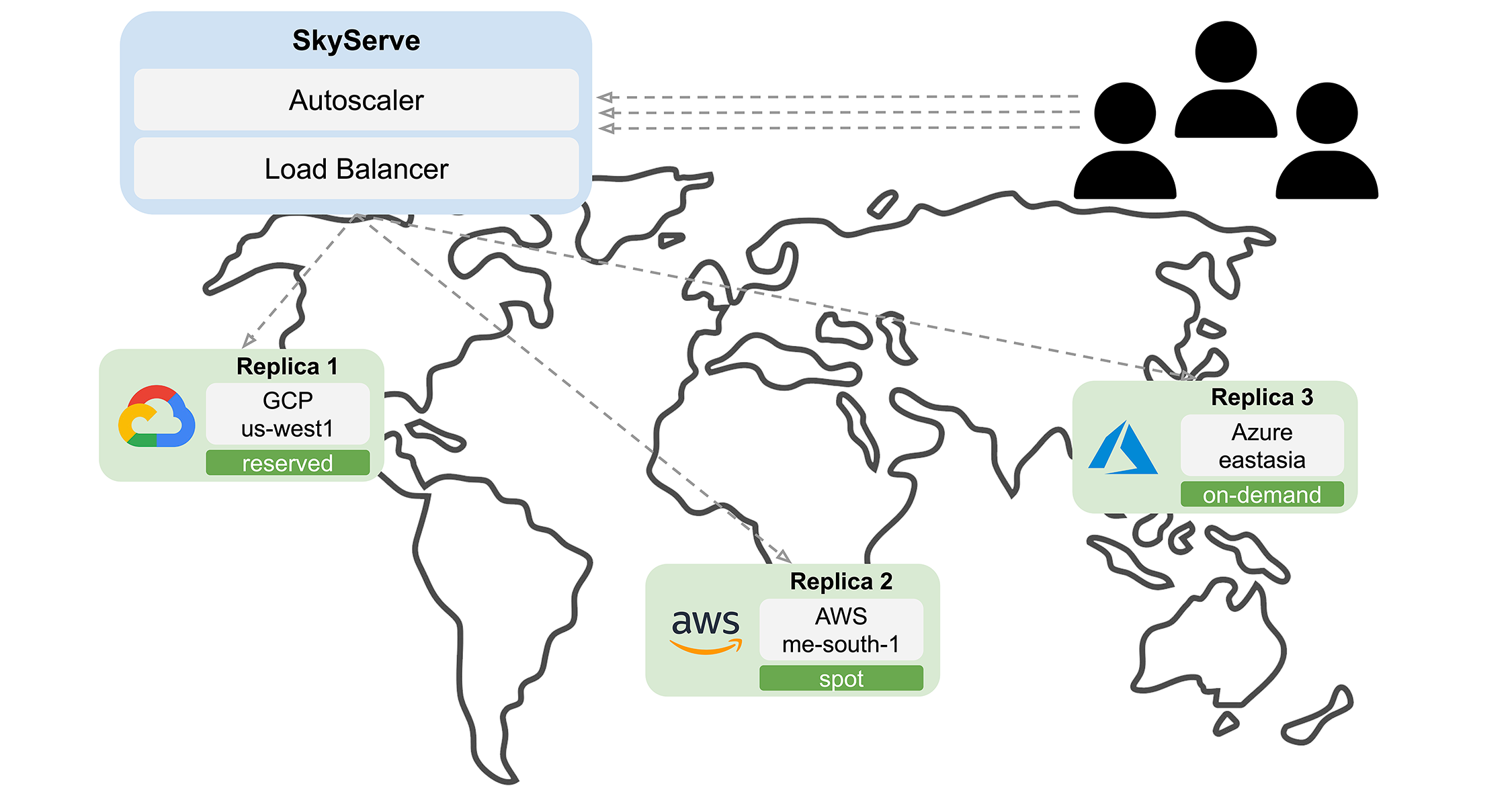
SkyServe is an open-source library that takes an existing serving framework and deploys it across one or more regions or clouds. SkyServe focuses on scaling GenAI models but also supports any service with HTTP endpoints, with intelligent support for reserved/on-demand/spot instances. Its goal is to make model deployment easier and cheaper, with a simple interface. SkyServe is being actively used by LMSysChatBot Arenain production which has processed over 800,000 requests and served ~10 open LLMs globally.
Our key observation is that GPU cost and availability are not uniformly distributed across clouds and regions. Intelligent optimization to pick the right resources can serve GenAI reliably with reduced cost. Moreover, location-based optimizations are feasible because GenAI workloads are largely dominated by computation time or queueing delay, instead of the network latency for cross-region communication (at most 300ms for network latency vs multiple seconds for compute). That said, SkyServe fully supports deploying a service in a single zone/region/cloud.
Why SkyServe
- Bring any inference engine (vLLM, TGI, …) and serve it with out-of-box load-balancing and autoscaling.
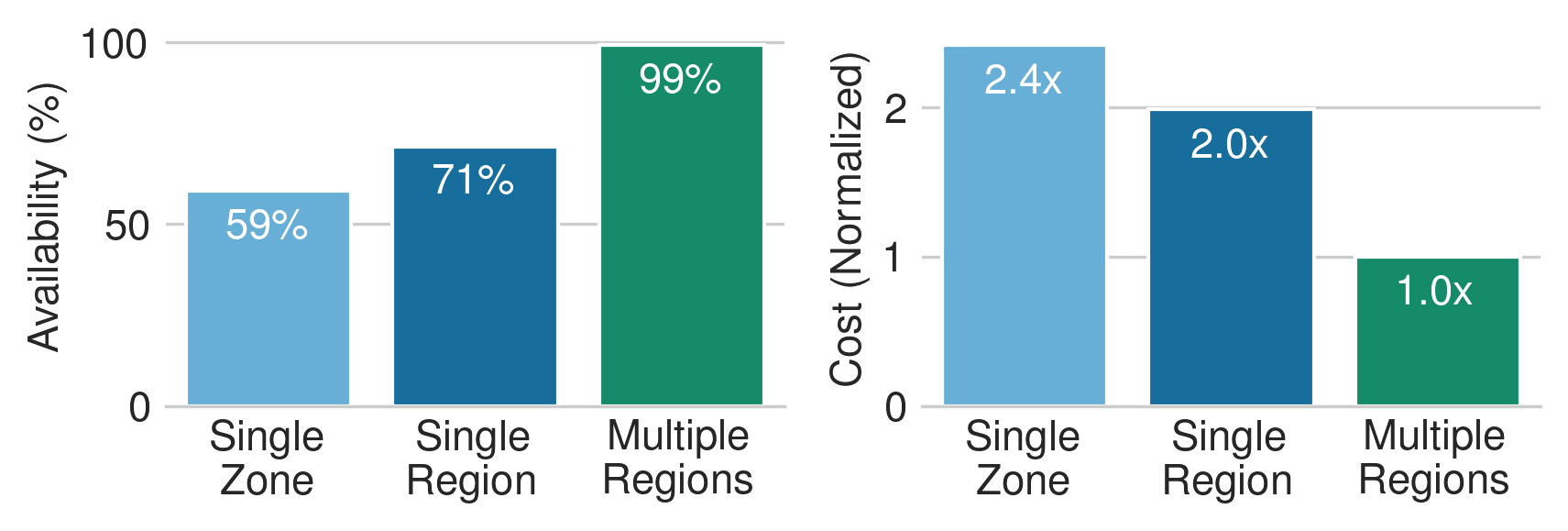
- Improve availability by leveraging different regions/clouds, and accelerators 1.
- Reduce costs by ~50% with automatic resources selection and spot instances 2.
- Simplify deployment with a unified service interface and automatic failure recovery.
How it works
Given an existing model inference engine (vLLM, TGI, …) that exposes HTTP endpoints, SkyServe deploys it across one or more regions or clouds. SkyServe will:
- Automatically figure out the locations (zone/region/cloud) with the cheapest resources and accelerators to use,
- Deploy and replicate the services on multiple “replicas”, and
- Expose a single endpoint that load-balances requests to a service’s replicas.
When any error or a spot preemption occurs, SkyServe will recover that replica by reoptimizing placement using the current price and availability.
Quick Tour #
First, let’s install SkyPilot and check that cloud credentials are set up (see docs here):
After installation, we can bring up a two-replica deployment of Mixtral 8x7b powered by the vLLM engine. To specify a service, define a Service YAML:
Fields required by a Service YAML are the service section and the resources.ports field. In the former, we configure the service:
readiness_probe: path to check the status of the service on a replica. SkyServe will probe this path and check if the return code is 200 OK. The request can be a health check API exposed by the service such as/healthor an actual request. If it fails to get a response, SkyServe will mark this replica as not ready and stop routing traffic to that replica 3.replicas: target number of replicas in this deployment. This is a shortcut for a fixed-replica deployment. An autoscaling option will be shown in the following section.
Also, the accelerators section under resources specifies a “set” of resources to use. When launching a replica, SkyServe will pick the accelerator that is cheapest and available. Effectively, specifying a set of resources bumps up GPU availability.
Finally, resources.ports is specified for the port all replicas expose for the service running on it.
Let’s spin up this service with 1 command:
That’s all you need! This will show some outputs containing the following table:
Here, all possible resources are shown across AWS, GCP, and Azure, cross with all possible accelerators listed in the YAML. After confirmation, SkyServe takes care of replica management, load-balancing, and optional autoscaling, with a SKyServe Controller VM.
You can use sky serve status to check the service status. After the service’s status becomes READY, it can start handling traffic:
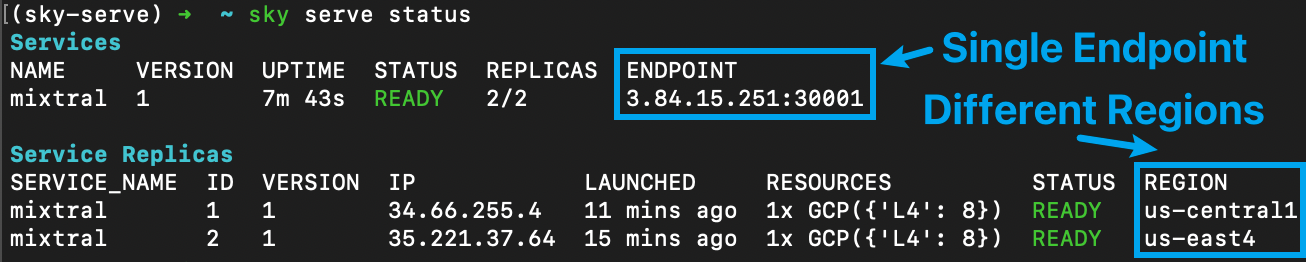
Note that the two replicas were launched in different regions for the lowest cost and highest GPU availability. In general, replicas can also be hosted on different cloud providers if a single cloud does not have enough GPU capacity. (See all cloud providers SkyPilot supports here.)
SkyServe generates a single service endpoint for all the replicas. This endpoint is load-balanced over all replicas by the SkyServe controller, and a simple curl -L against this endpoint will automatically be routed to one of the replicas (-L is needed as we are using HTTP redirection under the hood):
Congratulations! You have deployed the Mixtral model with 2 nodes. Next, let’s look at some advanced configurations in SkyServe to further improve the service.
Advanced Configurations #
Readiness probe
In the previous example, we used the /v1/models endpoint to double up as a health check endpoint. SkyServe periodically sends a GET request and expects a 200 OK which the system will interpret as “replica is ready”.
In the previous configuration, readiness_probe: <path> is a shorthand for the following specification, which is an HTTP GET request to the path:
SkyServe also allows sending a POST request as the readiness probe. This can be useful for several reasons, e.g., ensuring the GPU can actually handle requests. To use real compute traffic as the probe, we can specify a POST request:
With this, each readiness probe is a POST request for chat completion sent to a service replica. Although it may take a longer time to process the probe, this reflects the status of the system more accurately because the original /v1/models could succeed even though /v1/chat/completions is malfunctioning.
Due to the long cold start time of LLMs, e.g. installing dependencies, downloading models, and loading them to GPU memory, SkyServe ignores any initial readiness probe failure for 1200 seconds (or 20 minutes) by default. This can be configured as follows:
To update the service with the new configuration, we can run:
The new mixtral.yaml with readiness probe updated
Autoscaling
The previous example uses a simple deployment with a fixed number of replicas. This might not be ideal if the traffic shows large fluctuations (e.g., day vs. night traffic).
SkyServe supports autoscaling out of the box, based on the dynamic load (queries per second, or QPS) to the endpoint.
To enable autoscaling, you can specify some additional configurations by replacing the replicas field with a replica_policy config:
min_replicasandmax_replicasdetermine the lower and upper bound of the number of replicas.target_qps_per_replicais the threshold SkyServe uses to autoscale – the QPS (Queries Per Second) each service replica should handle in expectation. SkyServe will scale the service to ensure, each replica receives approximatelytarget_qps_per_replicaqueries per second.
Note that we set the min_replicas to 0, so that SkyServe can scale-to-zero to save costs when no requests are received for a period of time.
More details for autoscaling can be found in our doc.
To update the previous service to support autoscaling, run:
mixtral.yaml with advanced readiness probe and autoscaling
mixtral.yaml with advanced readiness probe and autoscaling
Managed Spot Instances: ~50% cost saving
The previous examples use On-Demand instances as service replicas. On-demand instances can be quite costly due to the nature of the expensive high-end GPU instances.
Spot instances, however, can offer more than 3x cost savings, though being less reliable due to preemptions and more scarce across regions/clouds. The stateless nature of model serving makes it suitable to run on spot instances. With SkyServe, a service can easily be deployed on spot instances with automatic preemption recovery, while enjoying the capacity across multiple regions/clouds.
By specifying use_spot: true in the resources section, SkyServe will launch spot instances for your service and auto-manage them:
With more regions, clouds, and accelerator types enabled, SkyServe could search for spot instances across multiple resource pools, which significantly increases spot instance availability. In addition, we suggest increasing the number of replicas or decreasing target_qps_per_replica to over-provision some spot instances for better handling of preemptions. For example, replacing 2 OnDemand replicas with 3 Spot replicas gives:
- Better service level guarantee;
- 50% cost saving.
Stay tuned for an advanced policy currently being added to SkyServe that provides even lower costs and makes recovery more intelligent.
SkyServe x Chatbot Arena #
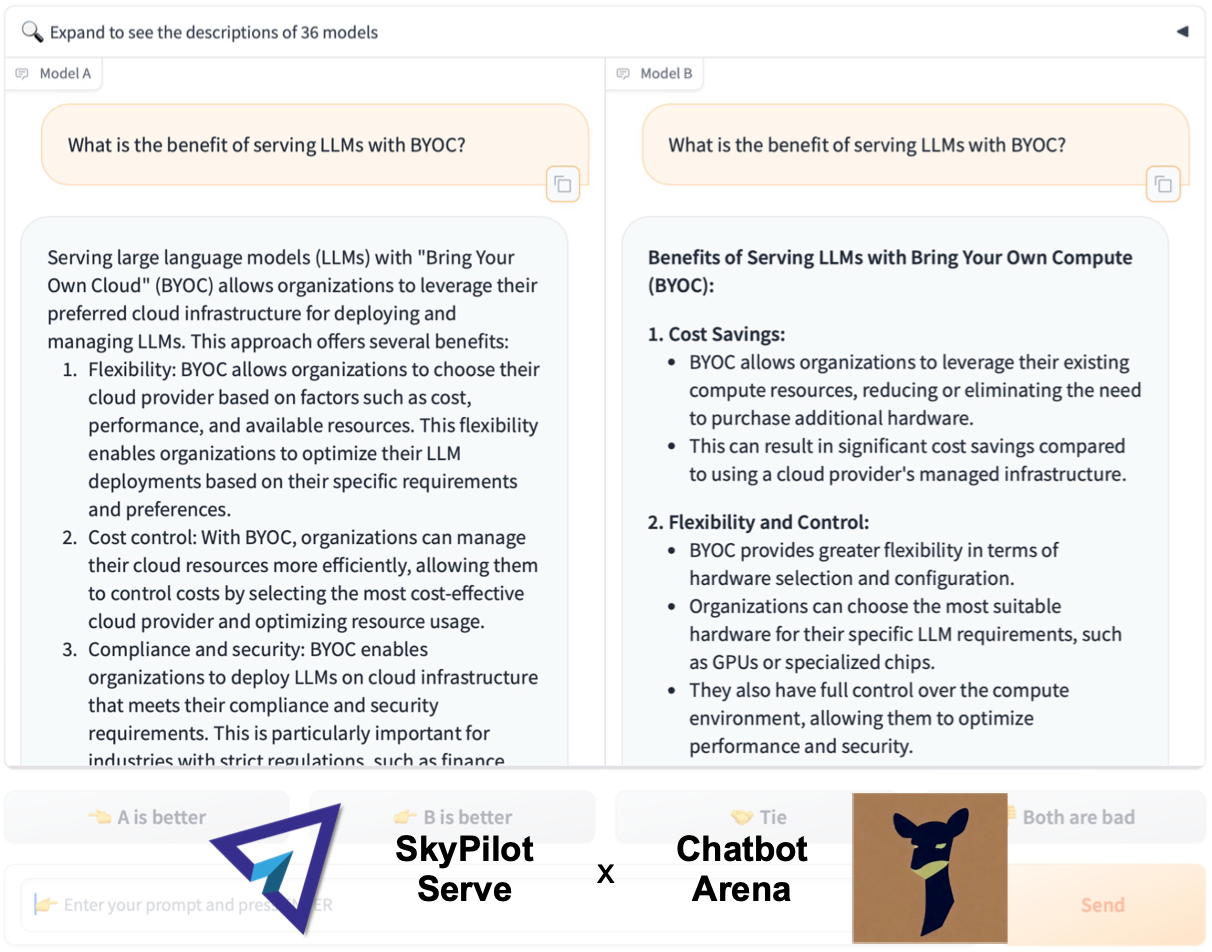
SkyServe has been used by LMSys Chatbot Arena to serve ~10 open models (including Mixtral, Llama2 and more) and process over 800,000 requests globally over the last four months. We’re happy to see that SkyServe is offering real value-adds for an LLM service: simple deployment and upgrades, high cost savings, and automatic failure recovery.
Runnable Examples #

SkyServe integrates with many popular open-source AI frameworks. Below are runnable examples that you can simply copy-paste and launch in your own cloud accounts.
- HuggingFace TGI: Any LLMs supported by the TGI framework can be easily launched. Simply switch models with an environment variable (the model ID)!
- Meta’s CodeLlama-70B: Use SkyServe to bring up your private CodeLlama-70B, and share it with your team via VSCode, API, and Chat endpoints! (Thanks to Tabby for the simple IDE integration.)
- vLLM: Easy, Fast, and Cheap LLM Serving with PagedAttention on SkyServe.
- SGLang: Try SGLang, the next-generation interface and runtime for LLM inference from LMSys, on SkyServe!
- Tabby: A light-weight code assistant that can be easily hosted with SkyServe and access it with VSCode!
- LoRAX: Easily use the Predibase LoRAX server to serve many hundreds of LoRAs.
Any OpenAI API-Compatible LLMs on HuggingFace TGI
Click to see huggingface-tgi.yaml and curl command
Learn more here.
Hosting Code Llama 70B from Meta
Click to see codellama.yaml and curl command
Learn more here.
vLLM: Serving Llama-2 with SOTA LLM Inference Engine
Click to see vllm.yaml and curl command
Learn more here.
Serving Multimodel Model LLaVA with SGLang
Click to see sglang.yaml and curl command
Learn more here.
Self-Hosted Light-Weight Code Assistant in VSCode with Tabby
Click to see tabby.yaml and curl command
Learn more here.
Scaling Multi-LoRA Inference Server Using LoRAX
Click to see lorax.yaml and curl command
Learn more here.
SkyServe Roadmap #
There are many exciting improvements on SkyServe’s roadmap:
- Customizable load-balancing and autoscaling
- AI clouds support (Lambda, RunPod) for 3x-4x cost saving
- More advanced Spot Policy - A Policy that offers > 50% cost saving using spot instances, while guaranteeing/improving service quality at the same time
- More advanced Multiple Accelerators support - Routing traffic to different accelerators for better cost-efficiency
Please stay tuned for these updates, and give us feedback by joining our Slack or filing issues on our GitHub repo. Come and join our SkyPilot open-source community to make AI workload much easier on any cloud!
Learn More #
Join our slack to chat with the SkyPilot community!
- The graph shows that going from a single zone to multiple regions increased the availability (the percentage of time that can launch a Spot V100 instance on AWS) from 59% to 100%. ↩︎
- Based on the Spot availability, assuming we have to use OnDemand instances when Spot instances are not available, the cost saving is around 2.4x. ↩︎
- Because probes may fail due to network congestion or overloaded computation, SkyServe won’t restart the replica immediately. If the probe fails for a specified period of time, SkyServe will terminate it and launch a new replica for you. ↩︎